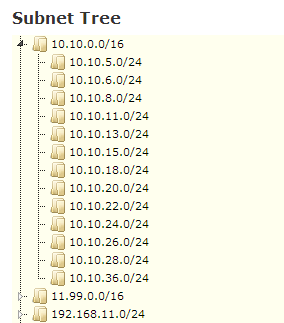
Edit subnet page has an option to "relocate" subnet for individual subnet. To do this in bulk, you can follow following steps.
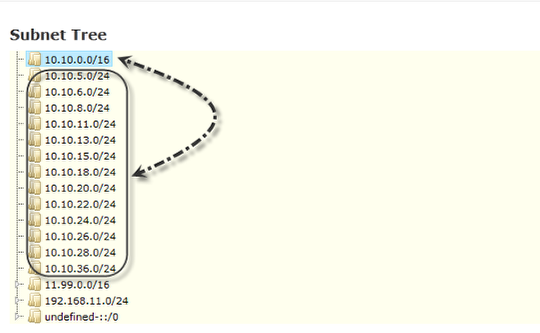
Export current subnets
Tools > Export > Subnet to get the CSV file. You can grab these from /api/1.0/subnets/ instead.
Also, you can skip these and directly enter the data in csv file as described below.
Create CSV file
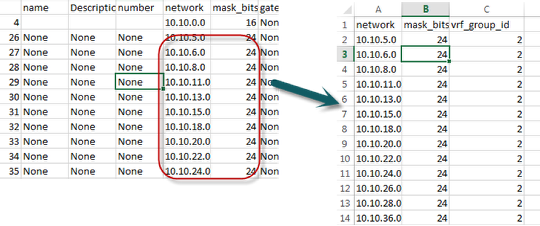
Create a csv file with 3 required headers: network, mask_bits and vrf_group_id. You can add name, description as extra columns if need be.
Network and mask_bits can be copied from CSV exported file in above step.
VRF group ID can be obtained via GUI, when you hover over the vrf group name, the last # in the url in status bar is the ID. (or you can export VRF groups from tools > exports > VRF)
Delete subnets to be re-imported
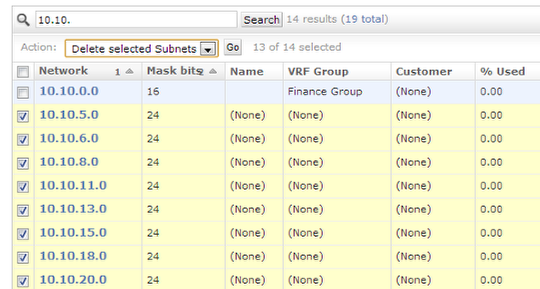
Since we will be re-adding these in right subnet, you need to delete the existing subnets(only those that will be re-imported). If IPs will be auto-discovered, then ignore the IPs. Otherwise, you can export IPs from Tools > Export or Reports > Report > Add Report > IP (and re-import IPs later).
Edit Python Script and execute
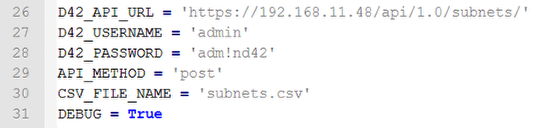
Grab csv2d42apis.py from https://github.com/device42/API_Helpers.
Change the lines as highlighted above.
You can then execute the script and it will re-create the subnets under the right parent.