
Sometimes we may need to delete a group of devices by bulk on Device42, this cannot be done simply by navigating to Resources -> All Devices
as we may have the devices on different pages therefore we cannot select all of them in the same time.
We will list here two different approaches to accomplish this task, assuming that the list of the devices names need to be deleted are known.
Delete using tags
Navigate to Tools -> Templates & Bulk Operations -> Imports/Exports (xls)
then download
Devices - Create/Update Devices (V2) -> Download Sample Excel File
on the exported file create a new column called “tags”
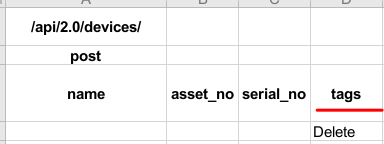
and define an optional value let say “Delete”, copy the name of the devices into the same Excel file under the “name” column, make sure the same tag value defined for all the devices.
As soon as the file will be ready, we can upload then import the file under
Tools -> Templates & Bulk Operations -> Imports/Exports (xls)

based on the step above all these devices will have the tag called “Delete”, after that we can navigate to
Resources -> All Devices
and filter by that tag

select all the devices under this list and delete using the drop-down actions menu
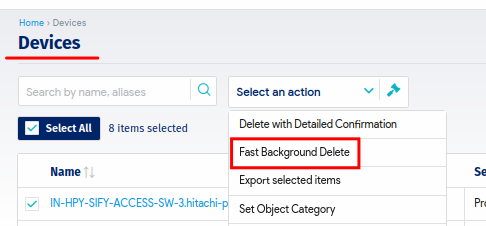
Delete using a scripting language (example listed here is a Bash script code)
Deleting devices can be also possible by using the API call and their corresponding IDs, as we have the names of these devices we can get their corresponding IDs like this using the bash script code
#!/bin/bash
while read LINE;
do
  ID=$(curl -s -k -X POST -d "header=no&query=select device_pk from view_device_v1 where name = '$LINE'" -u 'admin:pass' https://10.0.0.135/services/data/v1.0/query/)
  printf "$ID\n" ^<* id.txt
done < names.txt
we are reading the devices names here from the names.txt file, then using DOQL query to grab their IDs and write those IDs into another text file called id.txt
Once this is done we will have all the IDs needed to delete these devices, for that purpose we can use this bash script code
#!/bin/bash
while read LINE;
do curl -k -s -X DELETE  -u 'admin:pass' https://10.0.0.135/api/1.0/devices/$LINE/ --insecure | jq;
done < id.txt
Of course the complete code will be the combination of these two calls under the same code.
#!/bin/bash
while read LINE;
do
ID=$(curl -s -k -X POST -d "header=no&query=select device_pk from view_device_v1 where name = '$LINE'" -u 'admin:pass' https://10.0.0.135/services/data/v1.0/query/)
printf "$ID\n" ^<* id.txt
done < names.txt

while read LINE;
do curl -k -s -X DELETE -u 'admin:pass' https://10.0.0.135/api/1.0/devices/$LINE/ --insecure | jq;
done < id.txt
The same approach can be used with Python or Powershell script as well as needed.


