
If we want to add multiple devices on the same Rack unit, we need to take into consideration the "Position" field, as this will indicates where the device will be mounted and shown on the Rack unit.
The position field is called "x_pos" on the API or the bulk import file, and here is how it works:
To determine the x_pos value to use for your device use the equation
2520/X = x_pos value
where X = the width ratio of hardware model.
As an example a device with 1/4 width ratio you would do 2520/4 = 630, every increment of 630 would be a possible position for the device.
1/4 width ratio x_pos values:
0 = flush left
630 = 2nd position
1260 = 3rd position
1890 = final position
For instance if we have three devices which need to be mounted on the same Rack unit, we need to have the width ration 1/3 for each with a size unit defined, for instance
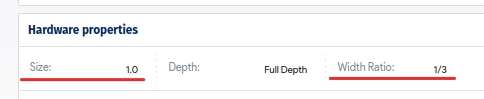
the x_pos values will be:
2520 / 3 = 840
therefore we will have: 0 for the device on the left hand side, then 840 for the second device and 1680 for the third.
Here is the Rack mounting properties:
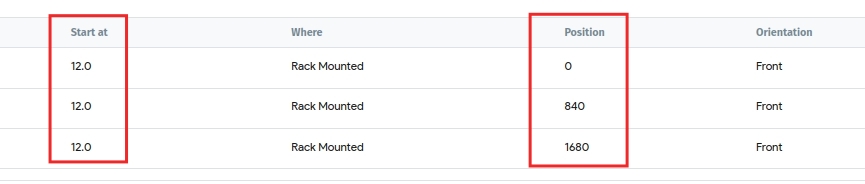
and here is the Rack layout view
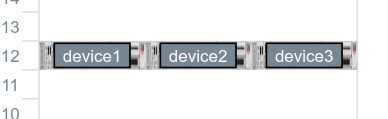
this operation can be done via the API call
https://api.device42.com/#!/Devices/postDeviceRack
or the bulk import method using the following file
Devices - Add Devices to Racks -> Download Sample Excel File


